
I had six different models make me PCB Footprints and 3D models (STEP) using nothing but the datasheet and the same prompt. These are tasks that are time-consuming and can make or break a board layout.
I tested Claude Opus, Fable, Sonnet, GPT 5.5, GPT 5.6 Sol (via codex) and Gemini 3.1 Pro (via gemini cli) 1. The results were far from perfect but were promising. They were mostly correct and made mistakes real engineers often make too.
I have a larger experiment I've been working on getting agents to do full board layouts, but this is a smaller experiment that I wanted to write up first.
Background
I've spent a ton of time experimenting with using AI to do circuit design and board layout. Many of the experiments were figuring out how to break up work well to avoid blowing up the AI context and coming up with the paths that real engineers can follow. I only started writing this up because multiple people asked me how I got it working. I'll do another essay around how my harness works and how you can use it yourself.
Experiment setup
This has required a ton of instrumentation and harness building. I have a separate machine running linux that I used to run these experiments. I used KiCad, since it's open source so we can extend it a lot easier.
I picked three parts that have relatively shorter datasheets.
- L324x4F (Renesas) - 32-lead QFN with an offset thermal pad
- USB Type B (On-Shore) - USB B1HSXX
- USB Mini-B (Molex) - 5003300572
The Challenge
I prompted the models to only use the data in the datasheet (and don't look online for the answer). Normally we would want an agent to first search local libraries and then the internet for an existing footprint and model. The agent could then try to validate them and move forward. Our experiment evaluates the models ability to parse a datasheet, generate real footprints and then generate a 3d model.
There are three stages (basically three sessions of each agent) to do the following tasks:
- Parse the datasheet and write up a json file describing everything needed for footprint and 3d model generation.
- Load the json file and write a kicad_mod footprint file.
- Load the json file and write a Python script using CadQuery to generate a 3d Model and run said Python code.
So I ran a total of 54 sessions (3 parts x 3 steps x 6 models) to evaluate all of this... I actually had a few early runs fail because of issues with my harness so it was well over 60 sessions.
I judged the footprints based upon my read of the datasheets. I judged the 3d models for a rough fit check. Most of my 3d model usage for PCB is just for rough fit check. I would definitely judge more harshly if I needed to make a mechanical part that mated with them.
Results
Let's start by going through the final results of the 3d models and footprints. I will then go into the details of each model and how they did. I'll also dig into how things broke down and what I learned from the failures.
QFN L324x4F (Renesas)
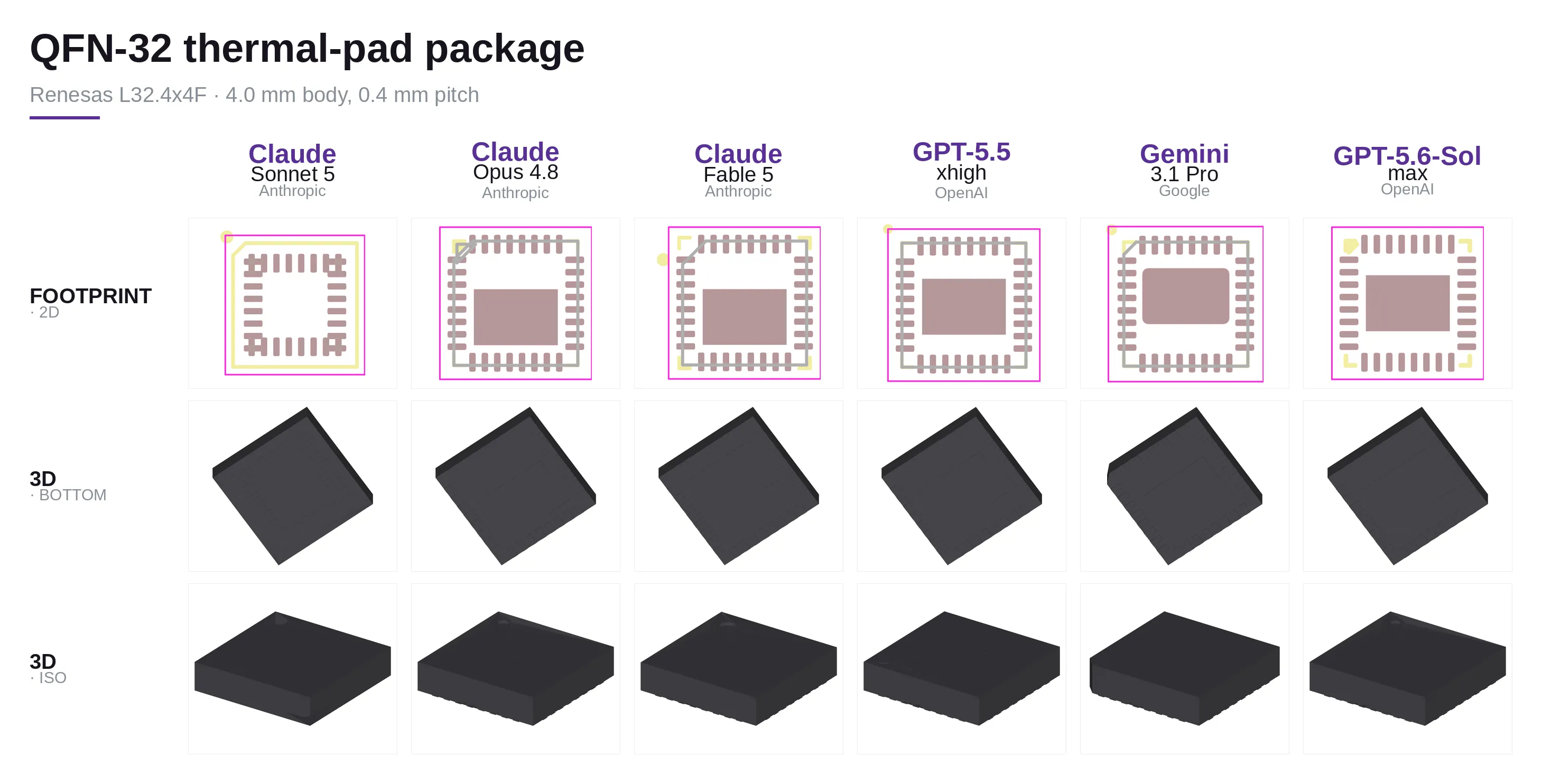 Footprints
For the QFN L324x4F, Fable and Opus have good results. Sonnet failed pretty bad. GPT-5.5, GPT-5.6 and Gemini failed to place the pad properly (see reasons in the Root Causes). Outside of Sonnet, all issues with the footprint would be a quick fix.
3d Models
The 3d models (except Sonnet) were all good.
USB Type B (On-Shore)
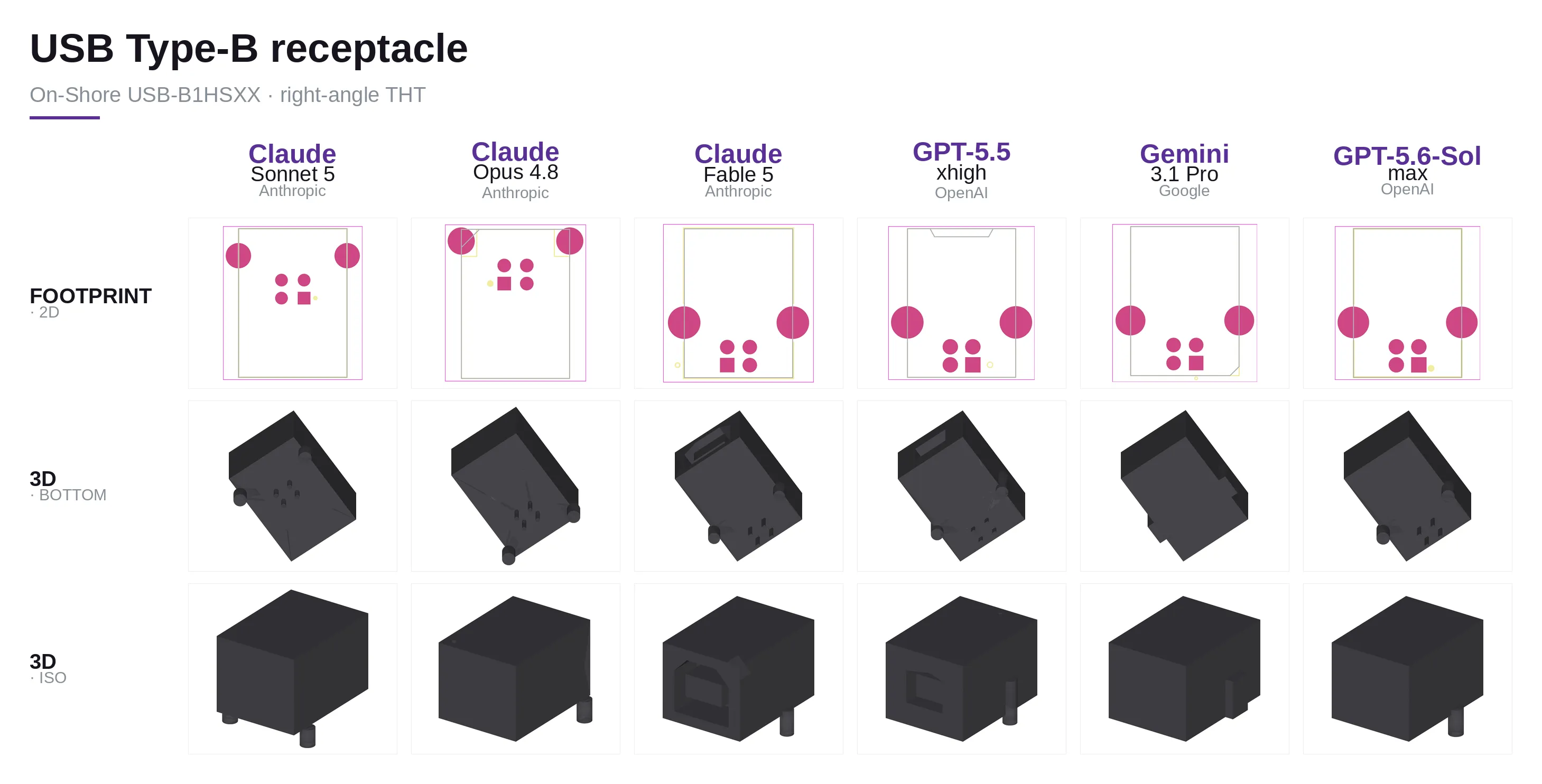 Footprints
For the USB Type B: Fable, GPT-5.5, GPT-5.6 Sol and Gemini all did well. Fable got the pinout correct, where GPT-5.5/Gemini/GPT-5.6 Sol all flipped the pinout. This is a common mistake that engineers make when reading the datasheet. These would take seconds for an engineer to fix.
Sonnet and Opus failed to anchor the pins from the correct reference point. Sonnet also mirrored the pinout.
3d Models
Sonnet, Gemini and GPT-5.5 all failed to parse the below board lead protrusion correctly -- but I didn't consider this a failure since the footprint is correct and the below board lead protrusion is only used for the 3d model.
Sonnet and Opus had the same issues from the footprint stage.
USB Mini-B (Molex)
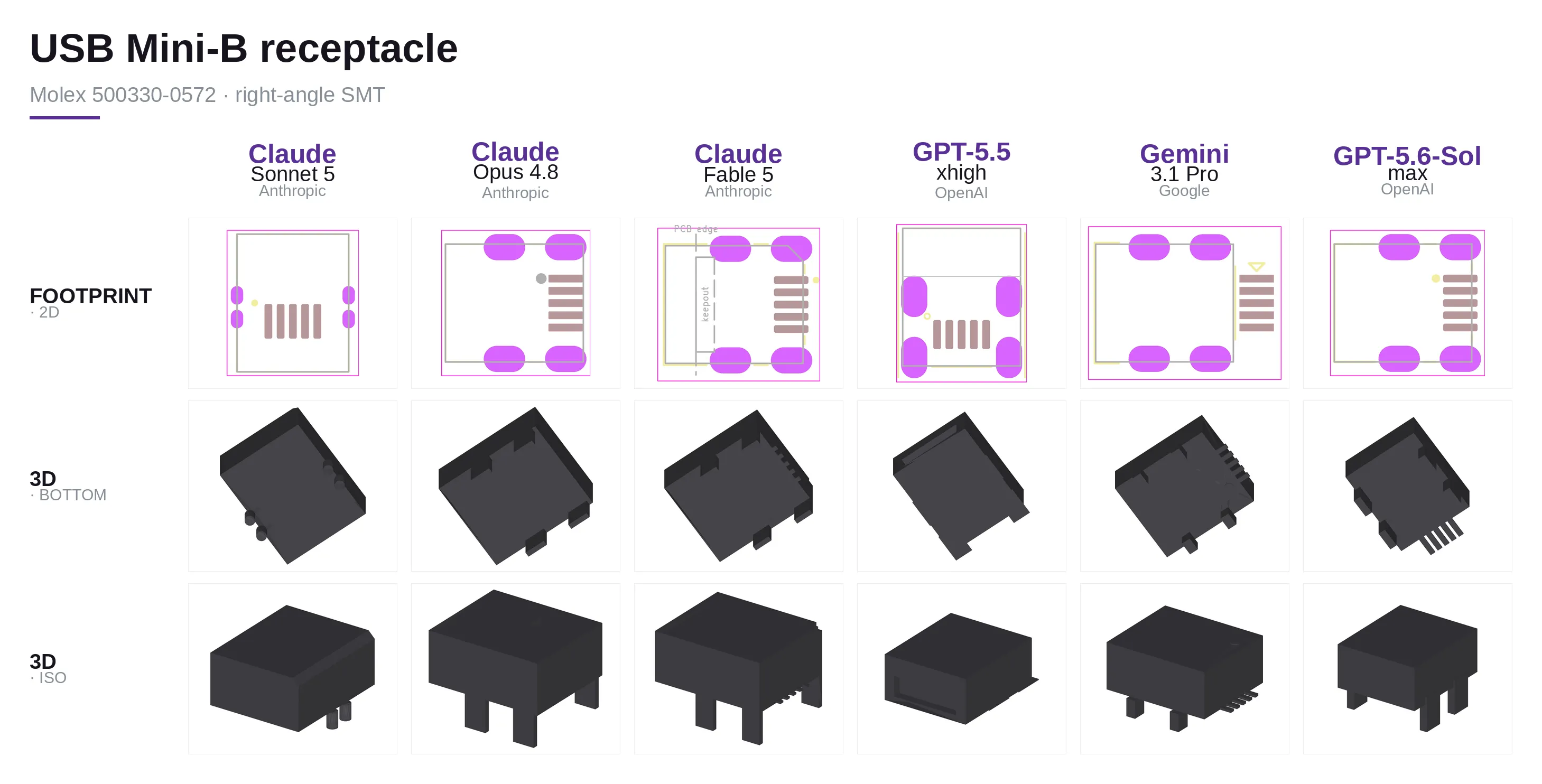 Footprints
Opus, Fable and GPT-5.6 Sol did well. Gemini and GPT-5.5 both failed to align the pads properly with the posts. Gemini also didn't add posts below PCB level.
3d Models
Fable, Opus and Gemini all did great! GPT-5.5 missed the posts under the PCB. Sonnet missed the sizes and positions of posts.
GPT-5.6 Sol had one minor issue: it extended the pins a bit beyond the datasheet spec. I didn't take off points, since it has no impact in practice. It would only create a weird render, but it shouldn't impact any normal use in a PCB layout (since that side would face into the PCB, and the footprint was correct).
Scores
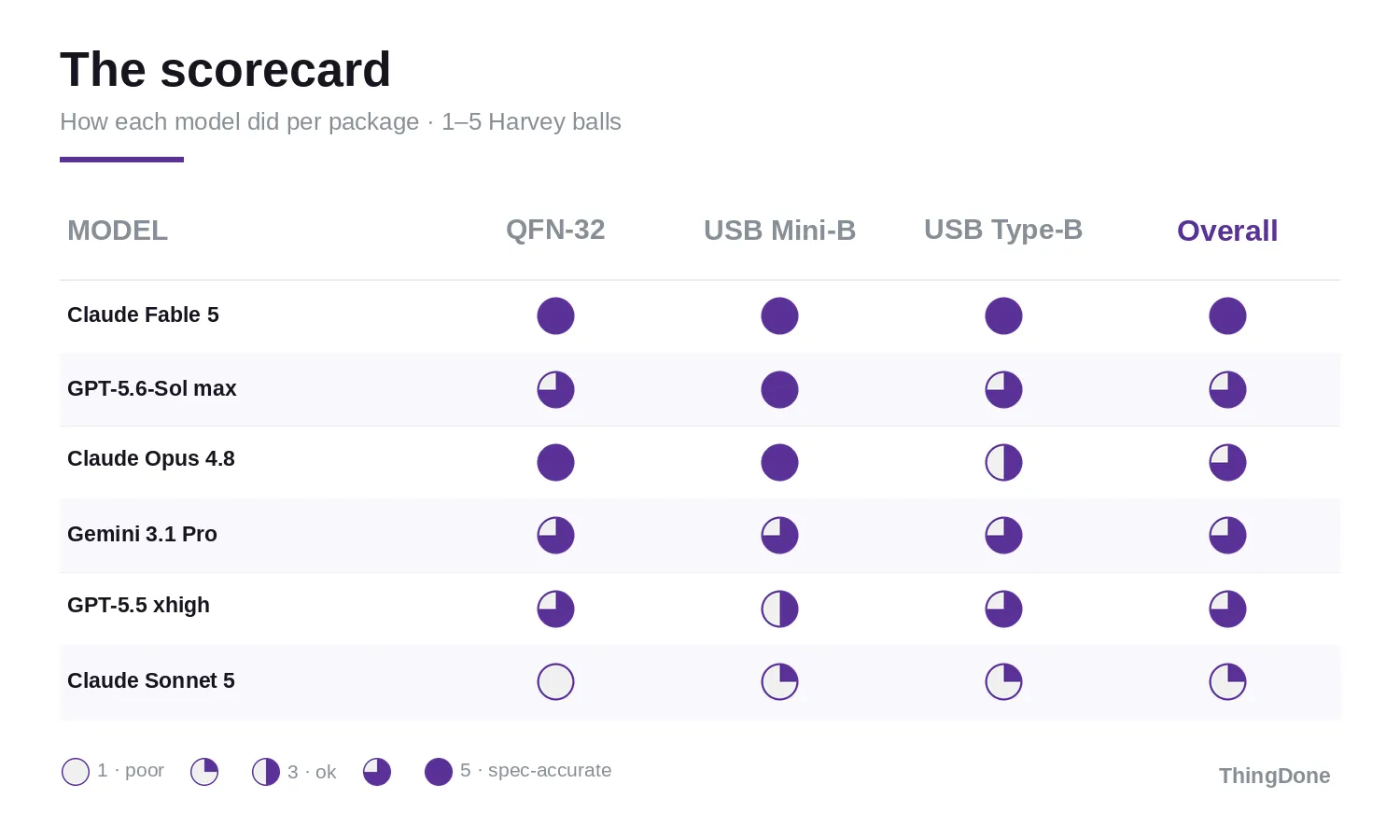
Diagnosing Failures
More important than the final score is understanding why a model failed. And the good news is: it's completely clear! It's all in the datasheet parsing.
The test ran each model through the same three prompts per part:
- parse the datasheet (
parsed.json+layout.md) - author the footprint (
.kicad_mod) - author the STEP model (
make_3d.py->.step).
I've already scored the final artifacts... but a score doesn't tell you where things went wrong. To identify the problem I went through the interim generated documents to identify what caused the errors.
The pipeline makes this surprisingly clean to answer. Stages 2 and 3 are told to build
from parsed.json. Stage 2 is allowed to re-open the datasheet "if a dimension is
ambiguous" — but stage 3 never even gets the datasheet path. The parse is all it has.
So for every defect the question is basically binary: was the bad number already
sitting in parsed.json (a stage-1 error), or did a good parse get mangled downstream
(a stage-2/3 error)?
I diffed all 18 parsed.json files field by field, pulled the pad coordinates out of
the 18 .kicad_mod files, read the dimension constants in the 18 generated python scripts,
and checked everything against the measured bounding boxes vs known good models. Six models (Sonnet 5, Opus 4.8, Fable 5,
GPT-5.5, Gemini 3.1 Pro, GPT-5.6 Sol Max) × three parts.
Root Causes
- Almost every error was born in the datasheet parsing. Of the defects worth writing
about, all but one trace back to a value that was already wrong — or missing — in
parsed.json. - Stage 2 seems reliable. 17/18 footprints are structurally correct for the parse they were handed: right pad counts, right pad types, loadable KiCad 9 syntax. Even Sonnet's bad footprints are faithful renderings of bad parses. The only stage-2 failure was GPT-5.6 Sol QFN footprint which didn't use the correct center pad offset.
- Issues with the parsing are never recovered on later stages.
- System Design Issues: We need to ensure we are prompting to parse the datasheets for 3d details for geometries BELOW the board in our stage 1.
Conclusion
Generally, Fable was the best, but the more interesting takeaway is that the failures often occur in the parsing stage. If we can get the parsing stage correct, the other stages are more likely to be correct.
I would suggest using two or more models to parse the datasheet and then compare the results. If they are different, have an engineer take a look and make the final decision.
This is a great way to leverage AI to speed up the work, but still have an engineer in the loop to ensure correctness.
If you want to see an experimental pcb layout harness I haven't had time to write up, check it out https://github.com/ThingDone/kicad_ai_workflow
Tips for AI with PCB stuff
The general idea: the current generation of AI agents is best on written words and code. So when it's time to work with hardware, the first step is to get it into something an agent can easily digest.
So instead of feeding it a PDF or image of your schematic, get it into a netlist format and use that instead.
Tips:
- Generally separating parsing documentation into text (or markdown) in a different AI context (or different session) than the work you want it to do.
- These agents are significantly better at writing code to do work than actually doing work themselves. Don't ask an AI to make a STEP or STL file of an object, instead ask it to write a Python script to generate a STEP or STL file.
- Get your documentation into some text format (markdown, text, etc) and have the AI reason about it. Don't have it read a PDF or image of a datasheet.
Footnotes
-
I ran the Claude models via Claude Code at Max effort. GPT-5.5 I ran at xhigh, GPT-5.6 Sol at max and Gemini cli didn't have a way to set the effort. ↩